Setting up a print-on-demand station can turn a crowded event into a memorable, hands-on experience. Guests choose a design, personalize it, and watch a product emerge within minutes. Yet the process is more demanding than placing a printer beside a table. Power access, file preparation, material handling, staff training, and queue control all affect the visitor experience.
This guide explores China’s top 10 approaches to building a practical print-on-demand station. It explains how to set up a print-on-demand station for events, from selecting reliable equipment to arranging a clean production workflow. You will see useful details, such as keeping blank products in labeled bins, placing a heat press away from visitors, and testing every design file before opening. Small decisions matter.
Keep the workflow visible.
A strong setup may include a tablet for orders, a production printer, approved inks, transfer paper, finishing tools, and clear pickup signage. Event teams should also protect customer information and use artwork with proper permission. Product safety and venue requirements deserve attention, especially around heat, electricity, ventilation, and crowded spaces.
Our early layouts were often too optimistic. Queues grew faster than expected. One missing cable caused unnecessary delays. That experience suggests a practical lesson: test the station under pressure, not only in a quiet showroom. The best system is not always the most impressive one. It is the one staff can operate consistently, safely, and honestly.
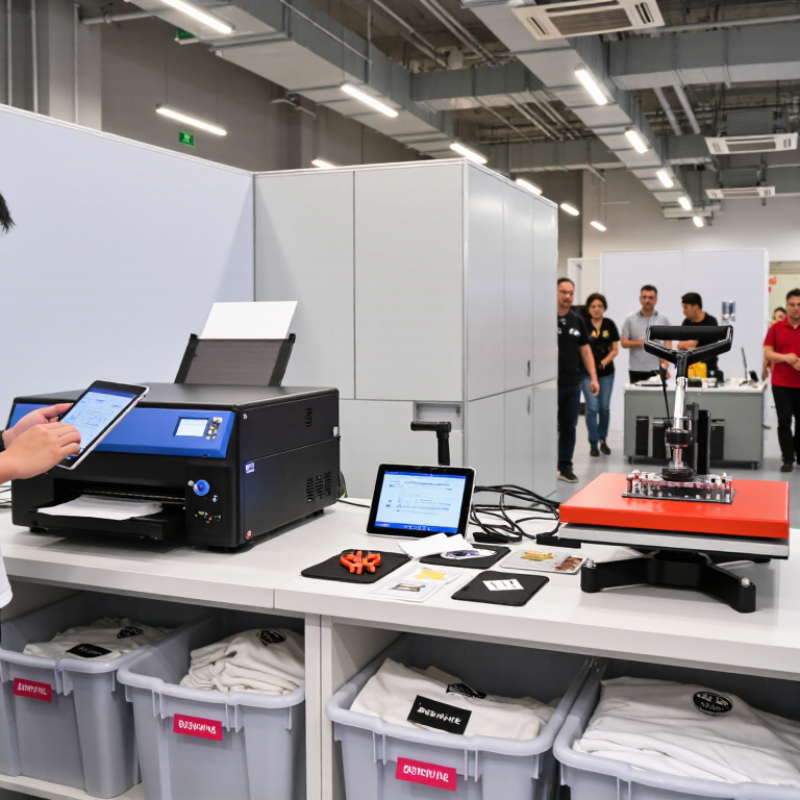
China’s print on demand station model is a compact micro-factory, not simply a printer beside a packing table. A typical station may include a direct-to-garment or dye-sublimation printer, heat press, curing area, inspection desk, and shipping shelf. Orders arrive digitally, while production starts only after payment and artwork checks. This reduces dead stock, a major advantage for small sellers.
The market signals are strong. Grand View Research estimated the global print on demand market at about USD 7.67 billion in 2023, with a projected 25.8% compound annual growth rate from 2024 to 2030. China’s scale adds operational pressure. The China Internet Network Information Center reported 915 million online shopping users in 2023. A station therefore needs fast data handling, stable suppliers, and clear quality records. In practice, I would test color consistency every shift and measure delivery time by order type, not averages.
Small details matter. Keep blank garments in labeled bins, separated by size and fabric. Photograph the first approved sample before batch production. Review failed prints weekly. That discipline is easy to skip. It is also where many stations lose money. Energy use, reprints, and manual packing can quietly weaken margins. The model is efficient, but not effortless. A realistic setup should leave space for mistakes, equipment maintenance, and human judgment.
China’s express delivery volume increased from 83.36 billion parcels in 2020 to 174.5 billion in 2024. This growth highlights the importance of modular printing, quality control, packing, and dispatch processes when setting up a print-on-demand station.
Source: China State Post Bureau annual express delivery statistics. Values are total express parcels in China, measured in billions.
Setting up a print-on-demand station starts with the workspace, not the printer. Grand View Research valued the global print-on-demand market at USD 6.18 billion in 2022. It also projected a 25.8% annual growth rate from 2023 to 2030. That growth rewards speed, but crowded benches create rework. Reserve separate zones for design, printing, heat pressing, cooling, packing, and waste. A 10–15 square metre room can support a small operation when aisles remain clear. Measure the electrical load before adding equipment.
Select equipment according to product volume and surface type. A direct-to-garment or film-transfer printer needs stable temperature, humidity, and routine nozzle checks. A calibrated heat press is equally important. Uneven pressure causes peeling, ghosting, and disappointing repeat orders. Install local ventilation where inks, powders, or heated materials require it. Follow safety data sheets and applicable workplace regulations.
Material control protects both quality and cash flow. Store blank garments flat, dry, and away from direct sunlight. Keep transfer films and inks sealed until use. Buy small test batches before committing to large inventory. In practice, attractive samples can hide poor wash resistance. I learned that the hard way. Record fabric type, curing time, pressure, and temperature for every test. The record may look excessive, but it exposes weak settings. Leave room for a reject shelf, because perfection is not a realistic production plan.
A print-on-demand station becomes reliable when design software, production devices, and order systems share one data path. The market is expanding fast. Grand View Research estimated the global print-on-demand market at USD 7.67 billion in 2023. Its report forecasts a 25.3% compound annual growth rate through 2030. The U.S. Census Bureau reported that e-commerce represented 16.1% of total retail sales in 2024. These figures support automation, but they do not remove setup discipline.
Start with a master product template containing print size, color profile, garment dimensions, and SKU rules. Connect the design tool through an API or secure integration. The order system should send SKU, size, color, quantity, delivery address, and payment status. A webhook can then trigger file checks and production queues. Keep each SKU unique. Small naming errors create expensive reprints. Before release, validate transparent backgrounds, image resolution, bleed, and color mode. A 300 DPI file is a practical baseline for many products, though material changes may require testing.
Physical proofing remains essential. Print one dark shirt, one light shirt, and one small graphic. Check edges, fabric texture, color shifts, and barcode readability. Do not trust the preview alone. Record failed tests beside successful settings. That habit feels slow. It prevents repeated mistakes. A final human review should confirm the artwork, order details, and shipping label before production begins.
A practical workflow for linking product design, print production, order processing, quality control, and fulfillment.
| Step | Station Component | Primary Function | Required Connection or File | Recommended Setup | Verification Check |
|---|---|---|---|---|---|
| 01 | Design workstation | Creates artwork, product templates, and print-ready layouts. | Design application with PDF, SVG, PNG, or TIFF export. | Use a calibrated display, organized project folders, and editable master files. | Confirm the document size, bleed, image resolution, and transparent areas before export. |
| 02 | Product template library | Keeps print areas, placement guides, and product measurements consistent. | Template files with documented width, height, safe area, and bleed. | Store one approved template per product, size, color, and print method. | Compare the artwork against the printable area and ensure no key element crosses the safe zone. |
| 03 | Color and preflight settings | Reduces color variation and production errors. | Embedded color profile, font handling, and preflight checklist. | Use the color space required by the chosen printing process and embed fonts or convert them to outlines when appropriate. | Open the exported file on a second system and check colors, fonts, transparency, and clipping. |
| 04 | Order intake system | Collects customer orders, addresses, variants, quantities, and personalization data. | Secure application programming interface, webhook, or structured CSV file. | Define mandatory fields for order ID, SKU, quantity, artwork reference, recipient, and shipping service. | Send a test order and confirm that every field arrives without truncation or character errors. |
| 05 | Artwork automation layer | Places customer artwork or text into the correct product template. | Variable data mapping, naming rules, and automated rendering output. | Map each SKU and personalization field to one approved template and output a unique production file. | Check that the output filename contains the order ID and that the correct product variant is rendered. |
| 06 | Print queue and production software | Schedules files and sends print jobs to the selected equipment. | Printer driver, raster image processor, hot folder, or monitored network folder. | Separate queues by material, print size, resolution, and finishing requirement. | Run a proof file and confirm scale, orientation, margins, color mode, and media selection. |
| 07 | Printing and curing area | Produces the physical item using the selected print process and material settings. | Approved media profile, temperature or curing settings, and equipment maintenance log. | Maintain clean surfaces, stable ventilation, correct media storage, and documented operating settings. | Inspect registration, coverage, adhesion, curing, surface defects, and size against the work order. |
| 08 | Order tracking and status updates | Moves orders through received, approved, printed, packed, and shipped states. | Status API, webhook response, or synchronized order database. | Use one order ID across design, production, inventory, packing, and delivery records. | Confirm that a test status change appears in the customer-facing order record. |
| 09 | Quality control and exception handling | Prevents incorrect, damaged, duplicated, or incomplete orders from shipping. | Barcode or QR reference, inspection checklist, reject reason, and reprint workflow. | Scan the order reference and compare the physical item with the approved digital proof. | Record defects by category and ensure rejected items cannot be marked as shipped. |
| 10 | Packing, shipping, and data backup | Completes fulfillment while protecting production records and customer information. | Shipping label data, packing slip, tracking number, access control, and scheduled backup. | Match the label to the order ID, use suitable packaging, restrict access, and back up templates and logs regularly. | Scan the parcel, confirm tracking synchronization, and test recovery of a sample production file. |
Setting up a print on demand station in China requires more than placing machines in one room.
Production, inspection, and packing should follow a clear physical flow. Keep printing equipment near material storage, but separate finished goods from unprocessed items. A clean table, bright lighting, and labeled shelves reduce handling mistakes. Leave enough space for staff to move safely. My first layout was too tight, and small delays quickly became expensive.
Quality control should begin before printing.
Check blank products for stains, sizing errors, and surface damage. During production, inspect color, alignment, image sharpness, and adhesion. Use a simple inspection sheet for every batch. Keep one approved sample beside the workstation. This makes comparison easier when workers are tired. Not every defect is obvious immediately. Wash testing or light rubbing can reveal weak prints. Record failed items honestly, even when the cause is uncertain.
Tips:
Use separate bins for approved, rework, and rejected products. Count items before packing. Fold garments consistently, protect fragile surfaces, and confirm the shipping label against the order record. A second person should review unusual orders. Small packing errors happen. They should be tracked, not hidden. Review defect records weekly and adjust temperature, pressure, curing time, or handling procedures when patterns appear. Simple controls often create more reliable results than complicated systems.
A print-on-demand station in China needs a shipping routine as precise as its production workflow. Each morning, staff should inspect blank stock, printer condition, and pending orders. Keep a simple dispatch board near the packing table. It should show the order number, destination, promised date, and handoff time. A calibrated scale prevents underpaid postage and unexpected adjustments. Small details matter. For international parcels, confirm address formats, product information, and destination restrictions before printing labels. This reduces delays and protects customer trust.
Control costs by recording materials, ink, labor minutes, packaging, shipping, and reprint losses for every order. A basic spreadsheet can reveal which products consume excessive time. Set a daily shipping cutoff, then group parcels by destination and service level. Use measured mailers instead of oversized boxes when protection remains adequate. Never reduce padding blindly. Damaged goods cost more than careful packing. My early estimates were too optimistic; reprints and failed delivery attempts were easy to overlook. Review them weekly, not only when profit falls.
Daily operations work best with short checks at opening, mid-shift, and closing. At opening, test one print and remove yesterday’s completed orders. Mid-shift, compare production progress with the dispatch board. At closing, reconcile shipped orders, remaining stock, and unresolved address issues. Train staff to photograph packed parcels when claims require evidence. Keep customer data private and limit access to necessary personnel. Leave time for maintenance. Rushed cleaning creates bigger problems later. Some procedures still need adjustment during holiday volume; honest records make corrections practical.
A 10–15 square metre room can support a small operation. Separate zones for design, printing, pressing, cooling, packing, and waste. Keep aisles clear. My first layout was too tight, and delays appeared quickly.
Match equipment to order volume and product surfaces. Choose stable printing equipment, a calibrated heat press, and suitable ventilation. Measure the electrical load before installation. Routine nozzle checks and pressure checks matter.
Store blank garments flat, dry, and away from sunlight. Keep films and inks sealed until use. Buy small test batches before ordering heavily. Large inventory can become expensive waste.
Inspect color, alignment, sharpness, and adhesion during production. Keep one approved sample beside the workstation. Wash testing and light rubbing may expose weak prints. Some defects appear later.
Record fabric type, curing time, pressure, and temperature for each test. Track failed items honestly, even when the cause remains uncertain. These records may seem excessive. They often reveal weak settings.
Use separate bins for approved, rework, and rejected products. Count items before packing. Fold garments consistently and protect fragile surfaces. A reject shelf is useful because perfection is unrealistic.
Keep a dispatch board near the packing table. List the order number, destination, promised date, and handoff time. Confirm addresses, product information, and destination restrictions. A second person should review unusual orders.
Record materials, ink, labor minutes, packaging, shipping, and reprint losses. A simple spreadsheet can show which products consume too much time. Review failed deliveries and reprints weekly. My early estimates were too optimistic.
At opening, test one print and inspect the equipment. Mid-shift, compare progress with the dispatch board. At closing, reconcile shipped orders, stock, and address problems. Leave time for maintenance. Rushed cleaning causes trouble.
This guide explains how to build an efficient print-on-demand station in China, with a focus on practical planning and smooth daily operation. It begins by introducing the station model and outlining how to choose suitable printing equipment, consumable materials, and a workspace that supports safe, organized production. It also covers the importance of connecting design software with printing and order-management systems, allowing customer requests to move efficiently from submission to finished product. For anyone researching How to set up a print-on-demand station for events, the guide offers a clear framework for preparing equipment, staff, and workflows.
The article also discusses production scheduling, quality inspection, packaging standards, and order accuracy. In addition, it explains how to coordinate shipping, estimate operating costs, manage inventory, and handle routine tasks such as maintenance and customer communication. By combining thoughtful preparation with consistent quality control, a print-on-demand station can respond quickly to changing demand while maintaining reliable service and cost awareness.

Diem printer